> ## Documentation Index
> Fetch the complete documentation index at: https://prefect-bd373955-pytest-markdown.mintlify.site/llms.txt
> Use this file to discover all available pages before exploring further.
# Write and run flows
> Learn the basics of defining and running flows.
Flows are the most central Prefect object. A flow is a container for workflow logic as code and allows users to configure
how their workflows behave.
Flows are defined as Python functions. Almost any Python function is eligible to be a flow.
They can take inputs, perform work, and return an output.
You can turn any function into a Prefect flow by adding the `@flow` decorator.
When a function becomes a flow, its behavior changes, giving it the following advantages:
* All runs of the flow have persistent [state](/3.0rc/develop/manage-states/). Transitions between states are recorded,
allowing you to observe and act on flow execution.
* Input arguments can be type validated as workflow parameters.
* Retries can be performed on failure.
* Timeouts can be enforced to prevent unintentional, long-running workflows.
* Metadata about [flow runs](#flow-runs), such as run time and final state, is automatically tracked.
* A flow can be elevated to a [deployment](/3.0rc/deploy/serve-flows/), which exposes a remote API for interacting with it.
## Run your first flow
**Prerequisites**
This section requires that you:
* Have installed Prefect
* Connected to Prefect Cloud or a self-hosted server instance
The simplest way to get started with Prefect is to annotate a Python function with the `@flow` decorator.
The script below fetches statistics about the [main Prefect repository](https://github.com/PrefectHQ/prefect).
(Note that [httpx](https://www.python-httpx.org/) is an HTTP client library and a dependency of Prefect.)
Turn this function into a Prefect flow and run the script:
```python repo_info.py
import httpx
from prefect import flow
@flow
def get_repo_info():
url = "https://api.github.com/repos/PrefectHQ/prefect"
response = httpx.get(url)
response.raise_for_status()
repo = response.json()
print("PrefectHQ/prefect repository statistics 🤓:")
print(f"Stars 🌠 : {repo['stargazers_count']}")
print(f"Forks 🍴 : {repo['forks_count']}")
if __name__ == "__main__":
get_repo_info()
```
Running this file results in the following output:
```bash
12:47:42.792 | INFO | prefect.engine - Created flow run 'ludicrous-warthog' for flow 'get-repo-info'
PrefectHQ/prefect repository statistics 🤓:
Stars 🌠 : 12146
Forks 🍴 : 1245
12:47:45.008 | INFO | Flow run 'ludicrous-warthog' - Finished in state Completed()
```
**Flows can contain arbitrary Python**
As shown above, flow definitions can contain arbitrary Python logic.
## Supported functions
Almost any standard Python function can be turned into a Prefect flow by adding the `@flow` decorator.
Flows are always executed in the main thread by default to facilitate native Python debugging and profiling.
### Synchronous functions
The simplest Prefect flow is a synchronous Python function. Here's an example of a synchronous flow that prints a message:
```python
from prefect import flow
@flow
def print_message():
print("Hello, I'm a flow")
print_message()
```
### Asynchronous functions
Prefect also supports asynchronous functions. The resulting flows are coroutines that can be awaited or run concurrently, following [the standard rules of async Python](https://docs.python.org/3/library/asyncio-task.html).
```python
import asyncio
from prefect import task, flow
@task
async def print_values(values):
for value in values:
await asyncio.sleep(1)
print(value, end=" ")
@flow
async def async_flow():
print("Hello, I'm an async flow")
# runs immediately
await print_values([1, 2])
# runs concurrently
coros = [print_values("abcd"), print_values("6789")]
await asyncio.gather(*coros)
asyncio.run(async_flow())
```
### Class Methods
Prefect supports synchronous and asynchronous class methods as flows, including instance methods, class methods, and static methods. For class methods and static methods, you must apply the appropriate method decorator *above* the `@flow` decorator:
```python
from prefect import flow
class MyClass:
@flow
def my_instance_method(self):
pass
@classmethod
@flow
def my_class_method(cls):
pass
@staticmethod
@flow
def my_static_method():
pass
MyClass().my_instance_method()
MyClass.my_class_method()
MyClass.my_static_method()
```
### Generators
Prefect supports synchronous and asynchronous generators as flows. The flow is considered to be `Running` as long as the generator is yielding values. When the generator is exhausted, the flow is considered `Completed`. Any values yielded by the generator can be consumed by other flows or tasks.
```python
from prefect import flow
@flow
def generator():
for i in range(10):
yield i
@flow
def consumer(x):
print(x)
for val in generator():
consumer(val)
```
**Generator functions are consumed when returned from flows**
The result of a completed flow must be serializable, but generators cannot be serialized.
Therefore, if you return a generator from a flow, the generator will be fully consumed and its yielded values will be returned as a list.
This can lead to unexpected behavior or blocking if the generator is infinite or very large.
Here is an example of proactive generator consumption:
```python
from prefect import flow
def gen():
yield from [1, 2, 3]
print('Generator consumed!')
@flow
def f():
return gen()
f() # prints 'Generator consumed!'
```
If you need to return a generator without consuming it, you can `yield` it instead of using `return`.
Values yielded from generator flows are not considered final results and do not face the same serialization constraints:
```python
from prefect import flow
def gen():
yield from [1, 2, 3]
print('Generator consumed!')
@flow
def f():
yield gen
generator = next(f())
list(generator) # prints 'Generator consumed!'
```
## Parameters
As with any Python function, you can pass arguments to a flow including both positional and keyword arguments.
These arguments defined on your flow function are called [parameters](/3.0rc/develop/write-flows/#parameters).
They are stored by the Prefect orchestration engine on the flow run object.
Prefect automatically performs type conversion of inputs using any provided type hints.
Type hints provide an easy way to enforce typing on your flow parameters and can be greatly enhanced with [Pydantic](https://pydantic-docs.helpmanual.io/).
Prefect supports *any* Pydantic model as a type hint within a flow is coerced automatically into the relevant object type:
```python
from prefect import flow
from pydantic import BaseModel
class Model(BaseModel):
a: int
b: float
c: str
@flow
def model_validator(model: Model):
print(model)
```
For example, to automatically convert something to a datetime:
```python
from prefect import flow
from datetime import datetime
@flow
def what_day_is_it(date: Optional[datetime] = None):
if date is None:
date = datetime.now(timezone.utc)
print(f"It was {date.strftime('%A')} on {date.isoformat()}")
if __name__ == "__main__":
what_day_is_it("2021-01-01T02:00:19.180906")
```
When you run this flow, you'll see the following output:
```bash
It was Friday on 2021-01-01T02:00:19.180906
```
Note that you can provide parameter values to a flow through the API using a [deployment](/3.0rc/deploy/serve-flows/).
Flow run parameters sent to the API on flow calls are coerced to the appropriate types.
**Prefect API requires keyword arguments**
When creating flow runs from the Prefect API, you must specify parameter names when overriding defaults.
They cannot be positional.
Parameters are validated before a flow is run.
If a flow call receives invalid parameters, a flow run is created in a `Failed` state.
If a flow run for a deployment receives invalid parameters, it moves from a `Pending` state to `Failed` without entering a `Running` state.
Flow run parameters cannot exceed `512kb` in size.
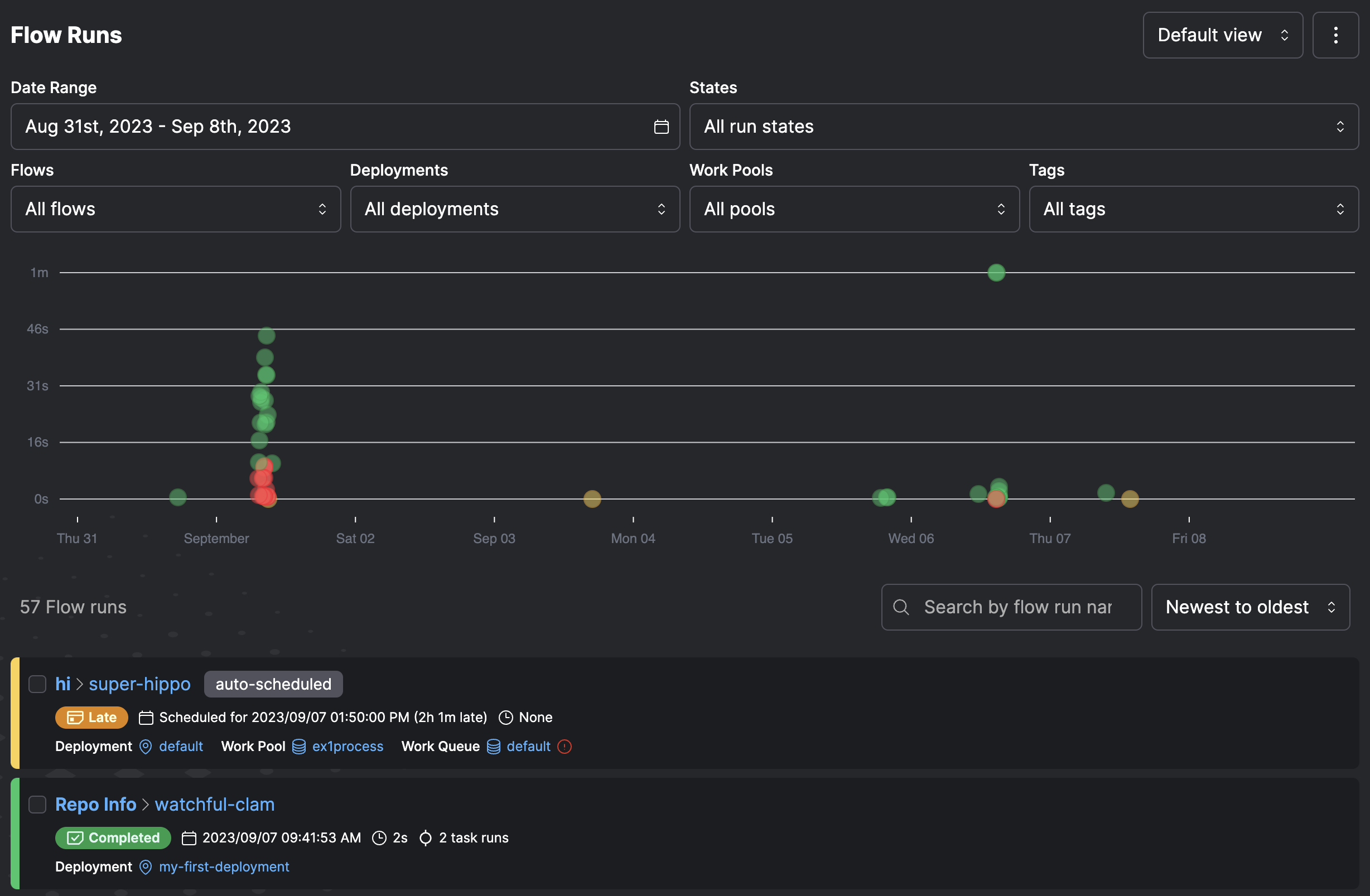
## Flow runs
A *flow run* represents a single execution of the flow.
You can create a flow run by calling the flow manually.
For example, by running a Python script or importing the flow into an interactive session and calling it.
You can also create a flow run by:
* Using external schedulers such as `cron` to invoke a flow function
* Creating a [deployment](/3.0rc/deploy/serve-flows/) on Prefect Cloud or a locally run Prefect server
* Creating a flow run for the deployment through a schedule, the Prefect UI, or the Prefect API
However you run the flow, the Prefect API monitors the flow run, capturing flow run state for observability.
**Logging**
Prefect enables you to log a variety of useful information about your flow and task runs.
You can capture information about your workflows for purposes such as monitoring, troubleshooting, and auditing.
Check out [Logging](/3.0rc/develop/logging) for more information.
When you run a flow that contains tasks or additional flows, Prefect tracks the relationship of each child run to the parent flow run.
**Retries**
Unexpected errors may occur. For example the GitHub API may be temporarily unavailable or rate limited.
Check out [Retries](/3.0rc/develop/recover-from-failure) to learn how to make your flows more resilient.
## Writing flows
The `@flow` decorator is used to designate a flow:
```python hl_lines="3"
from prefect import flow
@flow
def my_flow():
return
```
There are no rigid rules for what code you include within a flow definition. All valid Python is acceptable.
Flows are uniquely identified by name. You can provide a `name` parameter value for the flow.
If you don't provide a name, Prefect uses the flow function name.
```python hl_lines="1"
@flow(name="My Flow")
def my_flow():
return
```
Flows can call tasks to allow Prefect to orchestrate and track more granular units of work:
```python
from prefect import flow, task
@task
def print_hello(name):
print(f"Hello {name}!")
@flow(name="Hello Flow")
def hello_world(name="world"):
print_hello(name)
```
**Flows and tasks**
There's nothing stopping you from putting all of your code in a single flow function.
However, organizing your workflow code into smaller flow and task units lets you take advantage of Prefect features like retries,
more granular visibility into runtime state, the ability to determine final state regardless of individual task state, and more.
In addition, if you put all of your workflow logic in a single flow function and any line of code fails, the entire flow fails
and must be retried from the beginning.
You can avoid this by breaking up the code into multiple tasks.
You may call any number of other tasks, subflows, and even regular Python functions within your flow.
You can pass parameters to your flow function to use elsewhere in the workflow, and Prefect will report on the progress
and [final state](#final-state-determination) of any invocation.
Prefect encourages "small tasks." Each one should represent a single logical step of your workflow.
This allows Prefect to better contain task failures.
## Subflows
In addition to calling tasks within a flow, you can also call other flows.
Child flows are called [subflows](/3.0rc/develop/write-flows/#composing-flows) and allow you to efficiently manage,
track, and version common multi-task logic.
Subflows are a great way to organize your workflows and offer more visibility within the UI.
Add a `flow` decorator to the `get_open_issues` function:
```python hl_lines="1"
@flow
def get_open_issues(repo_name: str, open_issues_count: int, per_page: int = 100):
issues = []
pages = range(1, -(open_issues_count // -per_page) + 1)
for page in pages:
issues.append(
get_url.submit(
f"https://api.github.com/repos/{repo_name}/issues",
params={"page": page, "per_page": per_page, "state": "open"},
)
)
return [i for p in issues for i in p.result()]
```
Whenever you run the parent flow, the subflow is called and runs.
In the UI, each subflow run is linked to its parent and can be individually inspected.
## Flow settings
Flows allow a great deal of configuration by passing arguments to the decorator. Flows accept the following optional settings.
| Argument | Description |
| -------------------------------------------------- | -------------------------------------------------------------------------------------------------------------------------------------------------------------------------------------------------------------------- |
| `description` | An optional string description for the flow. If not provided, the description is pulled from the docstring for the decorated function. |
| `name` | An optional name for the flow. If not provided, the name is inferred from the function. |
| `retries` | An optional number of times to retry on flow run failure. |
| `retry_delay_seconds` | An optional number of seconds to wait before retrying the flow after failure. This is only applicable if `retries` is nonzero. |
| `flow_run_name` | An optional name to distinguish runs of this flow; this name can be provided as a string template with the flow's parameters as variables; you can also provide this name as a function that returns a string. |
| `task_runner` | An optional [task runner](/3.0rc/develop/task-runners/) to use for task execution within the flow when you `.submit()` tasks. If not provided and you `.submit()` tasks, the `ThreadPoolTaskRunner` is used. |
| `timeout_seconds` | An optional number of seconds indicating a maximum runtime for the flow. If the flow exceeds this runtime, it is marked as failed. Flow execution may continue until the next task is called. |
| `validate_parameters` | Boolean indicating whether parameters passed to flows are validated by Pydantic. Default is `True`. |
| `version` | An optional version string for the flow. If not provided, we will attempt to create a version string as a hash of the file containing the wrapped function. If the file cannot be located, the version will be null. |
For example, you can provide a `name` value for the flow. Here is the optional `description` argument
and a non-default task runner.
```python
from prefect import flow
@flow(
name="My Flow",
description="My flow with retries and linear backoff",
retries=3,
retry_delay_seconds=[10, 20, 30],
)
def my_flow():
return
```
You can also provide the description as the docstring on the flow function.
```python
@flow(
name="My Flow",
retries=3,
retry_delay_seconds=[10, 20, 30],
)
def my_flow():
"""My flow with retries and linear backoff"""
return
```
You can distinguish runs of this flow by providing a `flow_run_name`.
This setting accepts a string that can optionally contain templated references to the parameters of your flow.
The name is formatted using Python's standard string formatting syntax:
```python
import datetime
from prefect import flow
@flow(flow_run_name="{name}-on-{date:%A}")
def my_flow(name: str, date: datetime.datetime):
pass
# creates a flow run called 'marvin-on-Thursday'
my_flow(name="marvin", date=datetime.datetime.now(datetime.timezone.utc))
```
Additionally this setting also accepts a function that returns a string for the flow run name:
```python
import datetime
from prefect import flow
def generate_flow_run_name():
date = datetime.datetime.now(datetime.timezone.utc)
return f"{date:%A}-is-a-nice-day"
@flow(flow_run_name=generate_flow_run_name)
def my_flow(name: str):
pass
# creates a flow run called 'Thursday-is-a-nice-day'
if __name__ == "__main__":
my_flow(name="marvin")
```
If you need access to information about the flow, use the `prefect.runtime` module. For example:
```python
from prefect import flow
from prefect.runtime import flow_run
def generate_flow_run_name():
flow_name = flow_run.flow_name
parameters = flow_run.parameters
name = parameters["name"]
limit = parameters["limit"]
return f"{flow_name}-with-{name}-and-{limit}"
@flow(flow_run_name=generate_flow_run_name)
def my_flow(name: str, limit: int = 100):
pass
# creates a flow run called 'my-flow-with-marvin-and-100'
if __name__ == "__main__":
my_flow(name="marvin")
```
Note that `validate_parameters` check that input values conform to the annotated types on the function.
Where possible, values are coerced into the correct type. For example, if a parameter is defined as `x: int` and "5" is passed,
it resolves to `5`.
If set to `False`, no validation is performed on flow parameters.
## Composing flows
A *subflow* run is created when a flow function is called inside the execution of another flow.
The primary flow is the "parent" flow. The flow created within the parent is the "child" flow or "subflow."
Subflow runs behave like normal flow runs.
There is a full representation of the flow run in the backend as if it had been called separately.
When a subflow starts, it creates a new [task runner](/3.0rc/develop/task-runners/) for tasks within the subflow.
When the subflow completes, the task runner shuts down.
Subflows block execution of the parent flow until completion.
However, asynchronous subflows can run concurrently with [AnyIO task groups](https://anyio.readthedocs.io/en/stable/tasks.html) or
[asyncio.gather](https://docs.python.org/3/library/asyncio-task.html#id6).
Subflows differ from normal flows in that they resolve any passed task futures into data.
This allows data to be passed from the parent flow to the child easily.
The relationship between a child and parent flow is tracked by creating a special task run in the parent flow.
This task run mirrors the state of the child flow run.
A task that represents a subflow is annotated in its `state_details` with the presence of a `child_flow_run_id` field.
A subflow is identified with the presence of a `parent_task_run_id` on `state_details`.
You can define multiple flows within the same file.
Whether running locally or through a [deployment](/3.0rc/deploy/serve-flows/), you must indicate which flow is the entrypoint for a flow run.
**Cancelling subflow runs**
Inline subflow runs, specifically those created without `run_deployment`, cannot be cancelled without cancelling their parent flow run.
If you may need to cancel a subflow run independent of its parent flow run, we recommend deploying it separately and starting it using
the [run\_deployment](/3.0rc/api-ref/prefect/deployments/deployments/#prefect.deployments.deployments.run_deployment) function.
```python
from prefect import flow, task
@task(name="Print Hello")
def print_hello(name):
msg = f"Hello {name}!"
print(msg)
return msg
@flow(name="Subflow")
def my_subflow(msg):
print(f"Subflow says: {msg}")
@flow(name="Hello Flow")
def hello_world(name="world"):
message = print_hello(name)
my_subflow(message)
if __name__ == "__main__":
hello_world("Marvin")
```
You can also define flows or tasks in separate modules and import them for usage. For example, here's a simple subflow module:
```python
from prefect import flow, task
@flow(name="Subflow")
def my_subflow(msg):
print(f"Subflow says: {msg}")
```
Here's a parent flow that imports and uses `my_subflow()` as a subflow:
```python
from prefect import flow, task
from subflow import my_subflow
@task(name="Print Hello")
def print_hello(name):
msg = f"Hello {name}!"
print(msg)
return msg
@flow(name="Hello Flow")
def hello_world(name="world"):
message = print_hello(name)
my_subflow(message)
hello_world("Marvin")
```
Running the `hello_world()` flow (in this example from the file `hello.py`) creates a flow run like this:
```bash
$ python hello.py
15:19:21.651 | INFO | prefect.engine - Created flow run 'daft-cougar' for flow 'Hello Flow'
15:19:21.945 | INFO | Flow run 'daft-cougar' - Created task run 'Print Hello-84f0fe0e-0' for task 'Print Hello'
Hello Marvin!
15:19:22.055 | INFO | Task run 'Print Hello-84f0fe0e-0' - Finished in state Completed()
15:19:22.107 | INFO | Flow run 'daft-cougar' - Created subflow run 'ninja-duck' for flow 'Subflow'
Subflow says: Hello Marvin!
15:19:22.794 | INFO | Flow run 'ninja-duck' - Finished in state Completed()
15:19:23.215 | INFO | Flow run 'daft-cougar' - Finished in state Completed('All states completed.')
```
**Subflows or tasks?**
In Prefect you can call tasks *or* subflows to do work within your workflow, including passing results from other tasks to your subflow.
A common question is: "When should I use a subflow instead of a task?"
We recommend writing tasks that do a discrete, specific piece of work in your workflow. For example, calling an API, performing a database operation,
analyzing or transforming a data point.
Prefect tasks are well suited for parallel or distributed execution using distributed computation frameworks such as Dask or Ray.
For troubleshooting, the more granular you make your tasks, the easier it is to find and fix issues if a task fails.
Subflows enable you to group related tasks within your workflow.
Here are some scenarios where you should choose a subflow rather than calling tasks individually:
* Observability: Subflows, like any other flow run, have first-class observability within the Prefect UI and Prefect Cloud. You'll
see subflow status in the **Flow Runs** dashboard rather than having to dig down into the tasks within a specific flow run.
See [Final state determination](#final-state-determination) for examples of using task state within flows.
* Conditional flows: If you have a group of tasks that run only under certain conditions, you can group them within a subflow and
conditionally run the subflow rather than each task individually.
* Parameters: Flows have first-class support for parameterization, making it easy to run the same group of tasks in different use
cases by simply passing different parameters to the subflow in which they run.
* Task runners: Subflows enable you to specify the task runner used for tasks within the flow. For example, to optimize
parallel execution of certain tasks with Dask, group them in a subflow that uses the Dask task runner. You can use a different
task runner for each subflow.
## Final state determination
Read the documentation about [states](/3.0rc/develop/manage-states) before proceeding with this section.
The final state of the flow is determined by its return value. The following rules apply:
* If an exception is raised directly in the flow function, the flow run is marked as failed.
* If the flow does not return a value (or returns `None`), its state is determined by the states of all of the tasks and subflows within it.
* If *any* task run or subflow run failed, then the final flow run state is marked as `FAILED`.
* If *any* task run was cancelled, then the final flow run state is marked as `CANCELLED`.
* If a flow returns a manually created state, it is used as the state of the final flow run. This allows for manual determination of final state.
* If the flow run returns *any other object*, then it is marked as completed.
The following examples illustrate each of these cases:
### Raise an exception
If an exception is raised within the flow function, the flow is immediately marked as failed.
```python hl_lines="5"
from prefect import flow
@flow
def always_fails_flow():
raise ValueError("This flow immediately fails")
if __name__ == "__main__":
always_fails_flow()
```
Running this flow produces the following result:
```bash
22:22:36.864 | INFO | prefect.engine - Created flow run 'acrid-tuatara' for flow 'always-fails-flow'
22:22:37.060 | ERROR | Flow run 'acrid-tuatara' - Encountered exception during execution:
Traceback (most recent call last):...
ValueError: This flow immediately fails
```
### Return `none`
A flow with no return statement is determined by the state of all of its task runs.
```python
from prefect import flow, task
@task
def always_fails_task():
raise ValueError("I fail successfully")
@task
def always_succeeds_task():
print("I'm fail safe!")
return "success"
@flow
def always_fails_flow():
always_fails_task.submit().result(raise_on_failure=False)
always_succeeds_task()
if __name__ == "__main__":
always_fails_flow()
```
Running this flow produces the following result:
```bash
18:32:05.345 | INFO | prefect.engine - Created flow run 'auburn-lionfish' for flow 'always-fails-flow'
18:32:05.582 | INFO | Flow run 'auburn-lionfish' - Created task run 'always_fails_task-96e4be14-0' for task 'always_fails_task'
18:32:05.582 | INFO | Flow run 'auburn-lionfish' - Submitted task run 'always_fails_task-96e4be14-0' for execution.
18:32:05.610 | ERROR | Task run 'always_fails_task-96e4be14-0' - Encountered exception during execution:
Traceback (most recent call last):
...
ValueError: I fail successfully
18:32:05.638 | ERROR | Task run 'always_fails_task-96e4be14-0' - Finished in state Failed('Task run encountered an exception.')
18:32:05.658 | INFO | Flow run 'auburn-lionfish' - Created task run 'always_succeeds_task-9c27db32-0' for task 'always_succeeds_task'
18:32:05.659 | INFO | Flow run 'auburn-lionfish' - Executing 'always_succeeds_task-9c27db32-0' immediately...
I'm fail safe!
18:32:05.703 | INFO | Task run 'always_succeeds_task-9c27db32-0' - Finished in state Completed()
18:32:05.730 | ERROR | Flow run 'auburn-lionfish' - Finished in state Failed('1/2 states failed.')
Traceback (most recent call last):
...
ValueError: I fail successfully
```
### Return a future
If a flow returns one or more futures, the final state is determined based on the underlying states.
```python hl_lines="15"
from prefect import flow, task
@task
def always_fails_task():
raise ValueError("I fail successfully")
@task
def always_succeeds_task():
print("I'm fail safe!")
return "success"
@flow
def always_succeeds_flow():
x = always_fails_task.submit().result(raise_on_failure=False)
y = always_succeeds_task.submit(wait_for=[x])
return y
if __name__ == "__main__":
always_succeeds_flow()
```
Running this flow produces the following result—it succeeds because it returns the future of the task that succeeds:
```bash
18:35:24.965 | INFO | prefect.engine - Created flow run 'whispering-guan' for flow 'always-succeeds-flow'
18:35:25.204 | INFO | Flow run 'whispering-guan' - Created task run 'always_fails_task-96e4be14-0' for task 'always_fails_task'
18:35:25.205 | INFO | Flow run 'whispering-guan' - Submitted task run 'always_fails_task-96e4be14-0' for execution.
18:35:25.232 | ERROR | Task run 'always_fails_task-96e4be14-0' - Encountered exception during execution:
Traceback (most recent call last):
...
ValueError: I fail successfully
18:35:25.265 | ERROR | Task run 'always_fails_task-96e4be14-0' - Finished in state Failed('Task run encountered an exception.')
18:35:25.289 | INFO | Flow run 'whispering-guan' - Created task run 'always_succeeds_task-9c27db32-0' for task 'always_succeeds_task'
18:35:25.289 | INFO | Flow run 'whispering-guan' - Submitted task run 'always_succeeds_task-9c27db32-0' for execution.
I'm fail safe!
18:35:25.335 | INFO | Task run 'always_succeeds_task-9c27db32-0' - Finished in state Completed()
18:35:25.362 | INFO | Flow run 'whispering-guan' - Finished in state Completed('All states completed.')
```
### Return multiple states or futures
If a flow returns a mix of futures and states, the final state is determined by resolving all futures to states,
then determining if any of the states are not `COMPLETED`.
```python hl_lines="20"
from prefect import task, flow
@task
def always_fails_task():
raise ValueError("I am bad task")
@task
def always_succeeds_task():
return "foo"
@flow
def always_succeeds_flow():
return "bar"
@flow
def always_fails_flow():
x = always_fails_task()
y = always_succeeds_task()
z = always_succeeds_flow()
return x, y, z
```
Running this flow produces the following result.
It fails because one of the three returned futures failed.
Note that the final state is `Failed`, but the states of each of the returned futures is included in the flow state:
```bash
20:57:51.547 | INFO | prefect.engine - Created flow run 'impartial-gorilla' for flow 'always-fails-flow'
20:57:51.645 | INFO | Flow run 'impartial-gorilla' - Created task run 'always_fails_task-58ea43a6-0' for task 'always_fails_task'
20:57:51.686 | INFO | Flow run 'impartial-gorilla' - Created task run 'always_succeeds_task-c9014725-0' for task 'always_succeeds_task'
20:57:51.727 | ERROR | Task run 'always_fails_task-58ea43a6-0' - Encountered exception during execution:
Traceback (most recent call last):...
ValueError: I am bad task
20:57:51.787 | INFO | Task run 'always_succeeds_task-c9014725-0' - Finished in state Completed()
20:57:51.808 | INFO | Flow run 'impartial-gorilla' - Created subflow run 'unbiased-firefly' for flow 'always-succeeds-flow'
20:57:51.884 | ERROR | Task run 'always_fails_task-58ea43a6-0' - Finished in state Failed('Task run encountered an exception.')
20:57:52.438 | INFO | Flow run 'unbiased-firefly' - Finished in state Completed()
20:57:52.811 | ERROR | Flow run 'impartial-gorilla' - Finished in state Failed('1/3 states failed.')
Failed(message='1/3 states failed.', type=FAILED, result=(Failed(message='Task run encountered an exception.', type=FAILED, result=ValueError('I am bad task'), task_run_id=5fd4c697-7c4c-440d-8ebc-dd9c5bbf2245), Completed(message=None, type=COMPLETED, result='foo', task_run_id=df9b6256-f8ac-457c-ba69-0638ac9b9367), Completed(message=None, type=COMPLETED, result='bar', task_run_id=cfdbf4f1-dccd-4816-8d0f-128750017d0c)), flow_run_id=6d2ec094-001a-4cb0-a24e-d2051db6318d)
```
**Returning multiple states**
When returning multiple states, they must be contained in a `set`, `list`, or `tuple`.
If using other collection types, the result of the contained states are checked.
### Return a manual state
If a flow returns a manually created state, the final state is determined based on the return value.
```python hl_lines="16-19"
from prefect import task, flow
from prefect.states import Completed, Failed
@task
def always_fails_task():
raise ValueError("I fail successfully")
@task
def always_succeeds_task():
print("I'm fail safe!")
return "success"
@flow
def always_succeeds_flow():
x = always_fails_task.submit()
y = always_succeeds_task.submit()
if y.result() == "success":
return Completed(message="I am happy with this result")
else:
return Failed(message="How did this happen!?")
if __name__ == "__main__":
always_succeeds_flow()
```
Running this flow produces the following result.
```bash
18:37:42.844 | INFO | prefect.engine - Created flow run 'lavender-elk' for flow 'always-succeeds-flow'
18:37:43.125 | INFO | Flow run 'lavender-elk' - Created task run 'always_fails_task-96e4be14-0' for task 'always_fails_task'
18:37:43.126 | INFO | Flow run 'lavender-elk' - Submitted task run 'always_fails_task-96e4be14-0' for execution.
18:37:43.162 | INFO | Flow run 'lavender-elk' - Created task run 'always_succeeds_task-9c27db32-0' for task 'always_succeeds_task'
18:37:43.163 | INFO | Flow run 'lavender-elk' - Submitted task run 'always_succeeds_task-9c27db32-0' for execution.
18:37:43.175 | ERROR | Task run 'always_fails_task-96e4be14-0' - Encountered exception during execution:
Traceback (most recent call last):
...
ValueError: I fail successfully
I'm fail safe!
18:37:43.217 | ERROR | Task run 'always_fails_task-96e4be14-0' - Finished in state Failed('Task run encountered an exception.')
18:37:43.236 | INFO | Task run 'always_succeeds_task-9c27db32-0' - Finished in state Completed()
18:37:43.264 | INFO | Flow run 'lavender-elk' - Finished in state Completed('I am happy with this result')
```
### Return an object
If the flow run returns *any other object*, then it is marked as completed.
```python hl_lines="10"
from prefect import task, flow
@task
def always_fails_task():
raise ValueError("I fail successfully")
@flow
def always_succeeds_flow():
always_fails_task().submit()
return "foo"
if __name__ == "__main__":
always_succeeds_flow()
```
Running this flow produces the following result.
```bash
21:02:45.715 | INFO | prefect.engine - Created flow run 'sparkling-pony' for flow 'always-succeeds-flow'
21:02:45.816 | INFO | Flow run 'sparkling-pony' - Created task run 'always_fails_task-58ea43a6-0' for task 'always_fails_task'
21:02:45.853 | ERROR | Task run 'always_fails_task-58ea43a6-0' - Encountered exception during execution:
Traceback (most recent call last):...
ValueError: I am bad task
21:02:45.879 | ERROR | Task run 'always_fails_task-58ea43a6-0' - Finished in state Failed('Task run encountered an exception.')
21:02:46.593 | INFO | Flow run 'sparkling-pony' - Finished in state Completed()
Completed(message=None, type=COMPLETED, result='foo', flow_run_id=7240e6f5-f0a8-4e00-9440-a7b33fb51153)
```
## See also
* Store and reuse non-sensitive bits of data, such as configuration information, by using [variables](/3.0rc/develop/variables).
* Supercharge this flow with [tasks](/3.0rc/develop/write-tasks/) to break down the workflow's complexity and make it more performant and observable.